The short version
- What happened: two serious flaws in PHP could let a stranger take control of a web server just by sending it a specially crafted request. No password needed.
- Is there a fix? Yes. PHP released fixed versions on 21 October 2026: 8.5.12, 8.4.27, 8.3.36 and 8.2.35.
- Do you need to update WordPress? No. The fix happens on your hosting server, not in WordPress or your plugins.
- What should you do? Check your PHP version, and if it's older than the versions above, ask your host to update it today. If your host already has, you're done.
The rest of this post explains each part, without assuming you're a developer.
What PHP is, and why your site probably uses it
When someone visits your website, a program on your hosting server builds the page they see. On most small business websites, that program is written in a language called PHP.
WordPress runs on PHP. So do WooCommerce, Joomla, Drupal and many hosting control panels. If you've never thought about PHP, that's normal. It works quietly in the background, the way the engine in your car does.
That's also why this update matters. When the engine has a fault, it doesn't matter how nice the paintwork is. Every site running on a vulnerable version of PHP is exposed, however well the site itself is built.
What went wrong, in plain terms
The two flaws have official names, CVE-2026-109618 and CVE-2026-109619, and security researchers nicknamed them "PHP2Shell". Both are rated 9.2 out of 10 for severity, which is in the "critical" band.
Both are about memory, the scratch space a server uses while it handles each visit.
- The first flaw happens when the server runs out of memory partway through handling a request. It can stop halfway, leaving half-finished data behind, and then the clean-up step treats that unfinished data as if it were valid.
- The second flaw is about leftovers. A server handles many visits one after another. Normally each visit starts with a clean slate, but this flaw let some data from an earlier visit survive after it should have been thrown away, and a later visit could pick it up.
Think of a busy kitchen. One flaw is a cook who gets interrupted mid-order and leaves things half done; the other is a station that isn't wiped down between orders. Either way, the next order can trip over the mess. A skilled attacker could arrange that mess on purpose.
The result, in the worst case, is what security people call remote code execution: a stranger on the internet can make your server run their own commands. That's how websites get defaced, filled with spam links, turned into malware hosts, or have their data stolen.
Why it was so urgent
Normally, security fixes follow a quiet, coordinated process: researchers report the problem privately, the fix is prepared, hosting companies get a head start, and only then is everything announced.
This time, details leaked early. On 20 October 2026, information about the flaws appeared online a day before the planned announcement. The PHP team moved the release forward and published the fixes on 21 October.
Within a day, security researchers had published test exploits, and some showed the attack working against WordPress, Drupal and Joomla in lab conditions. At the time of writing (24 October), security firms report attempts to attack servers but no confirmed widespread attacks. That window is exactly why updating quickly matters.
Are you affected? How to check your PHP version
You don't need technical skills for this. If you use WordPress:
- Log in to your WordPress dashboard.
- Go to Tools, then Site Health, then the Info tab.
- Open the Server section and look at PHP version.
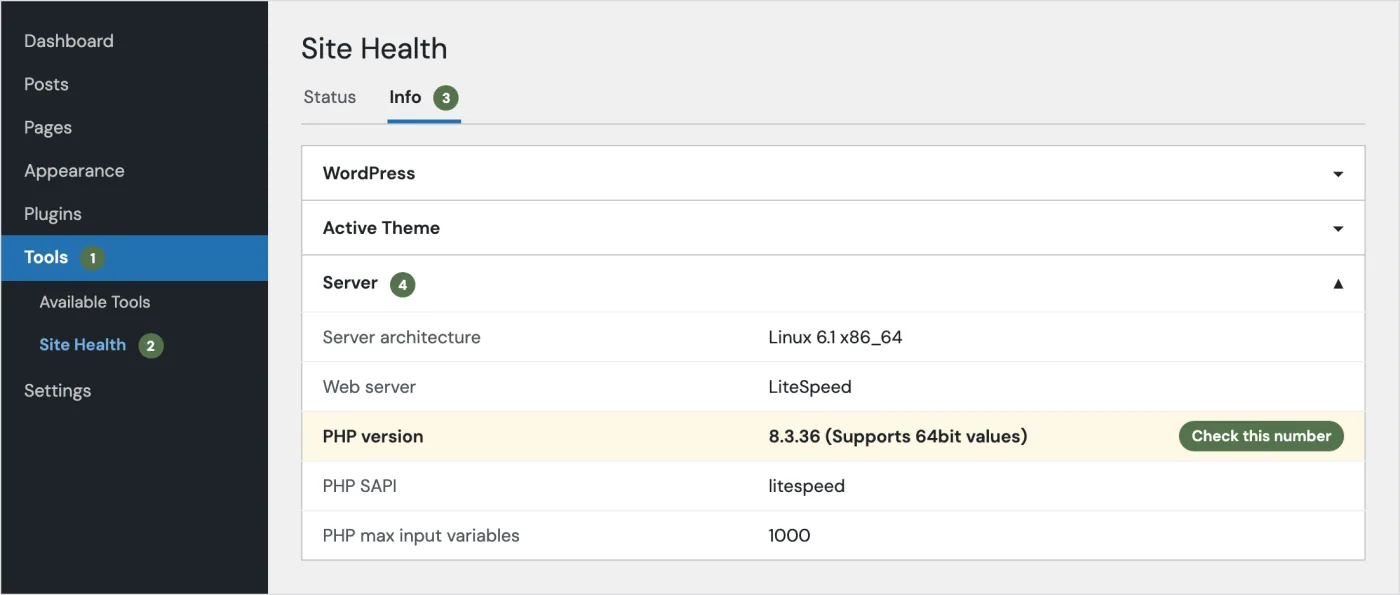
On other platforms, your hosting control panel usually shows the PHP version (in cPanel, look for "Select PHP Version" or "MultiPHP Manager"). Then compare it with this list:
- PHP 8.5: safe at 8.5.12 or later.
- PHP 8.4: safe at 8.4.27 or later.
- PHP 8.3: safe at 8.3.36 or later.
- PHP 8.2: safe at 8.2.35 or later.
- PHP 8.1 or older: see the section on old versions below.
Some dashboards only show "8.3" without the last number. If so, the quickest answer is to ask your host directly.
What to do
If a hosting company manages your server
This is most small businesses: shared hosting, managed WordPress hosting, or a website someone else looks after. The fix is your host's job, and many acted on the day. GoDaddy, SiteGround and InMotion Hosting, for example, all published notices saying they had patched their platforms.
Don't assume, though. Check your host's status page or news, or send them a short message. You can copy this one:
Hi,

Could you confirm that PHP on my hosting account has been updated
for the critical PHP security release of 21 October 2026
(CVE-2026-109618 and CVE-2026-109619)?

My site is: example.com
My current PHP version shows as: [version from Site Health]

If it hasn't been updated yet, when will it be? Thanks.
If you or your developer manage the server
If your site runs on its own server (a VPS or cloud server), whoever looks after it needs to install the updated PHP packages and restart PHP so the fix actually takes effect. On a typical Ubuntu or Debian server, that looks something like this:
sudo apt update && sudo apt upgrade
php -v                              # confirm the new version number
sudo systemctl restart php8.3-fpm   # or apache2, depending on the setup
The PHP team was clear that updating is the only complete fix. They listed some temporary settings that reduce the risk if an update truly can't happen straight away, but they don't make a server safe on their own.
If your site is on PHP 8.1 or older
This is the uncomfortable part. PHP 8.1 and older versions no longer get official updates from the PHP project. For this incident, the PHP security team did publish code fixes for 7.4, 8.0 and 8.1, and some Linux distributions and paid support vendors package those for their customers, but there's no new official release to install.
In practice, if your site is on PHP 8.1 or older:
- Ask your host what they've done. Some hosts apply these fixes to old versions themselves.
- Plan an upgrade to PHP 8.4 or 8.5. This was overdue anyway. Old PHP versions miss every future security fix, not just this one.
- Test before switching. Older themes and plugins sometimes break on newer PHP. A developer can test the upgrade on a copy of your site first, so the live site isn't the guinea pig.
WordPress.org went as far as passing on UK government security guidance: if you run your own server on an old version and can't fix it quickly, consider taking it offline until you can.
What about the third issue?
On 23 October, the PHP team published a smaller, related advisory, now tracked as CVE-2026-115560. It only affects sites with an unusual combination of settings, and the PHP team describes it as "unlikely". There's a simple setting change that blocks it, and a full fix will come in the next regular PHP release.
For most website owners, this one is your host's or developer's to handle. It's worth asking about in the same message.
Signs a site may have been hit
Updating protects you from now on. It doesn't undo anything that happened before. Be suspicious if you notice:
- Admin users in WordPress that you didn't create.
- Your site redirecting visitors to other websites, especially on phones.
- Pages, posts or links about things your business has nothing to do with (pharmacy, casino and loan spam are common).
- A warning from Google, your browser, or your host saying the site is unsafe.
- Your site suddenly becoming very slow, or your host reporting unusual activity.
If you see any of these, contact your host or developer straight away, change your passwords, and don't delete anything yet: the files and logs help work out what happened. A clean backup from before 20 October is your best friend here.
The next deadline: PHP 8.2 ends on 31 December 2026
Even once this is fixed, there's another date to know. PHP 8.2 stops receiving security fixes on 31 December 2026. After that, the next flaw like this one won't be fixed for 8.2 at all.
If your site is on 8.2, this is a good moment to move to PHP 8.4 or 8.5. 8.4 gets security fixes until the end of 2028, and 8.5 until the end of 2029. For most WordPress sites, the upgrade is a setting your host can change in minutes, after a quick test that your theme and plugins are happy.
While you're checking things, my free Website QA tool will flag other security basics on your site, like an expiring SSL certificate, missing security headers or outdated jQuery. It can't see your server's PHP version, so use the steps above for that.
Wrapping up
This was one of the more serious PHP security incidents in years, and the early leak made it more urgent than usual. The good news is that the fix is simple: get your server onto PHP 8.5.12, 8.4.27, 8.3.36 or 8.2.35 or later. For most people, that means one message to your host.
If you'd like someone to check your site and handle the upgrade for you, get in touch.
Sources
- PHP.net news: the official security releases (21 October 2026) and the advisory about session upload progress (23 October 2026).
- WordPress.org: Critical PHP Security Release.
- Rapid7's technical analysis, including exploitation status.
- PHP supported versions, for the end-of-life dates.
Keep reading
PHP 8.2 End of Life (31 December 2026): How to Upgrade Your WordPress Site Safely
PHP 8.2 stops getting security fixes on 31 December 2026. Which version to move to, what can break, and a step-by-step plan to upgrade WordPress safely.
Read the post GuideHow I QA a Website Before Handover (My Actual Checklist)
The pre-launch QA checklist I run on every website before handover, from content and forms to SEO, speed and go-live, and the order I run it in.
Read the post Free toolWebsite QA Audit
Paste a URL and get a full QA pass: speed, SEO, accessibility, security, broken links and content slips, with a fix for each issue.
Run an audit